


Short answer: Power Automate itself is covered by Microsoft's HIPAA Business Associate Agreement, but the AI service you connect to a flow is not. Any third-party connector that touches protected health information needs its own BAA with your organization. BastionGPT is now a Microsoft-certified Power Platform connector built for exactly this: HIPAA-compliant AI actions for Power Automate, Power Apps, Copilot Studio, and Azure Logic Apps, with a BAA from Bastion Intelligence and no code to write. As of September 2026, it is the only Power Automate connector that provides HIPAA-compliant access to GPT, Claude, and Gemini models.
For most practices, Power Automate is the healthcare workflow automation software they already own through Microsoft 365. This guide covers where Microsoft's coverage ends, why the common AI connectors fall outside it, and how to add HIPAA-compliant AI to a healthcare workflow in a few minutes.
Is Power Automate HIPAA compliant? What Microsoft's BAA covers
The Power Automate cloud service is on Microsoft's list of services in scope for its HIPAA BAA, alongside Power Apps, Power BI, and Office 365 services such as Exchange Online, SharePoint Online, OneDrive for Business, Microsoft Teams, and Forms. Copilot Studio is covered under the same BAA. The BAA is available by default through Microsoft's Data Protection Addendum for covered entities and business associates, so most healthcare organizations on Microsoft 365 already have it.
Coverage is not the same as compliance. Microsoft says so directly: a BAA supports your compliance program, and your organization is responsible for how flows are built and secured. In practice that means data loss prevention policies, least-privilege connections, and Secure Inputs and Secure Outputs on any step that handles PHI, because Power Automate stores each step's inputs and outputs in run history.
Are AI connectors in Power Automate HIPAA compliant?
Usually not, and this is where healthcare flows go wrong. Microsoft's BAA covers Microsoft services. It stops at the boundary of any connector that sends data to another company. When a flow passes an email body or a document to an outside AI service, that vendor becomes a business associate and needs its own BAA with you, covering the exact service the connector calls.
That rules out the easy options. Consumer ChatGPT has no BAA. General-purpose AI APIs offer one only to certain customers and only for named services, and the independent publisher connectors that call them are not published or supported by the AI vendor. Microsoft's own Azure OpenAI connector keeps the AI inside Microsoft's Azure agreement, but it means an Azure subscription, an Azure OpenAI resource and model deployment, prompt design, and ongoing upkeep for your IT team, and unless Microsoft approves modified abuse monitoring for your subscription, flagged prompts and completions can be stored for human review. Microsoft's AI Builder is the closest built-in option, but its models are general purpose, it is metered in AI Builder credits, and Microsoft's HIPAA in-scope list names Power Automate, Power Apps, and Power BI rather than AI Builder, so confirm coverage with Microsoft before PHI reaches it. For a fuller checklist, see what makes an AI tool HIPAA compliant.
A Microsoft-certified, HIPAA-compliant AI connector for Power Automate
BastionGPT is a HIPAA-compliant AI assistant built for healthcare by Bastion Intelligence. The connector, certified by Microsoft, published by Bastion Intelligence, and listed in Microsoft's connector directory, gives your flows five actions that call the same HIPAA-compliant AI API our customers use directly:
- Ask a question. Send a single question, with optional instructions and an optional document ID, and get back a plain-text answer. This is the simplest way to draft a summary, a reply, or a triage note.
- Create a chat completion. Send a full multi-turn conversation when you need more control, including your own system message.
- Upload a document. Upload a PDF, image, or text file (up to 10 MB) and get a document ID you can reference in questions for 30 days.
- Submit audio for transcription. Send a recording and get a transcript ID back right away.
- Get a transcript. Retrieve the finished transcript with speaker labels and timestamps.
BastionGPT selects a model for each request from OpenAI's GPT, Anthropic's Claude, and Google's Gemini families (see which models power BastionGPT), and every request runs under your BAA with Bastion Intelligence. Your content is never used to train AI models, and the assistant is designed for clinical language. There is nothing to deploy: create a connection with your API key and start building. Details on encryption and data handling are on our security page.
Four ways to add AI to a healthcare flow
| Approach | Code required | Who covers the AI step under a BAA | Built for healthcare |
|---|---|---|---|
| Independent publisher connector to a general AI API | Some: prompts and response parsing | Only if the AI vendor signs a BAA for that exact service | No |
| Microsoft AI Builder | No, but metered in AI Builder credits | Confirm with Microsoft; not named on its HIPAA in-scope list | No |
| Microsoft's Azure OpenAI connector | Prompt design, plus an Azure subscription, Azure OpenAI resource, and model deployment to maintain | Microsoft, under your Azure agreement | No |
| BastionGPT certified connector | No | Bastion Intelligence | Yes |
Examples: AI healthcare workflow automation in Power Automate
Triage patient email with AI
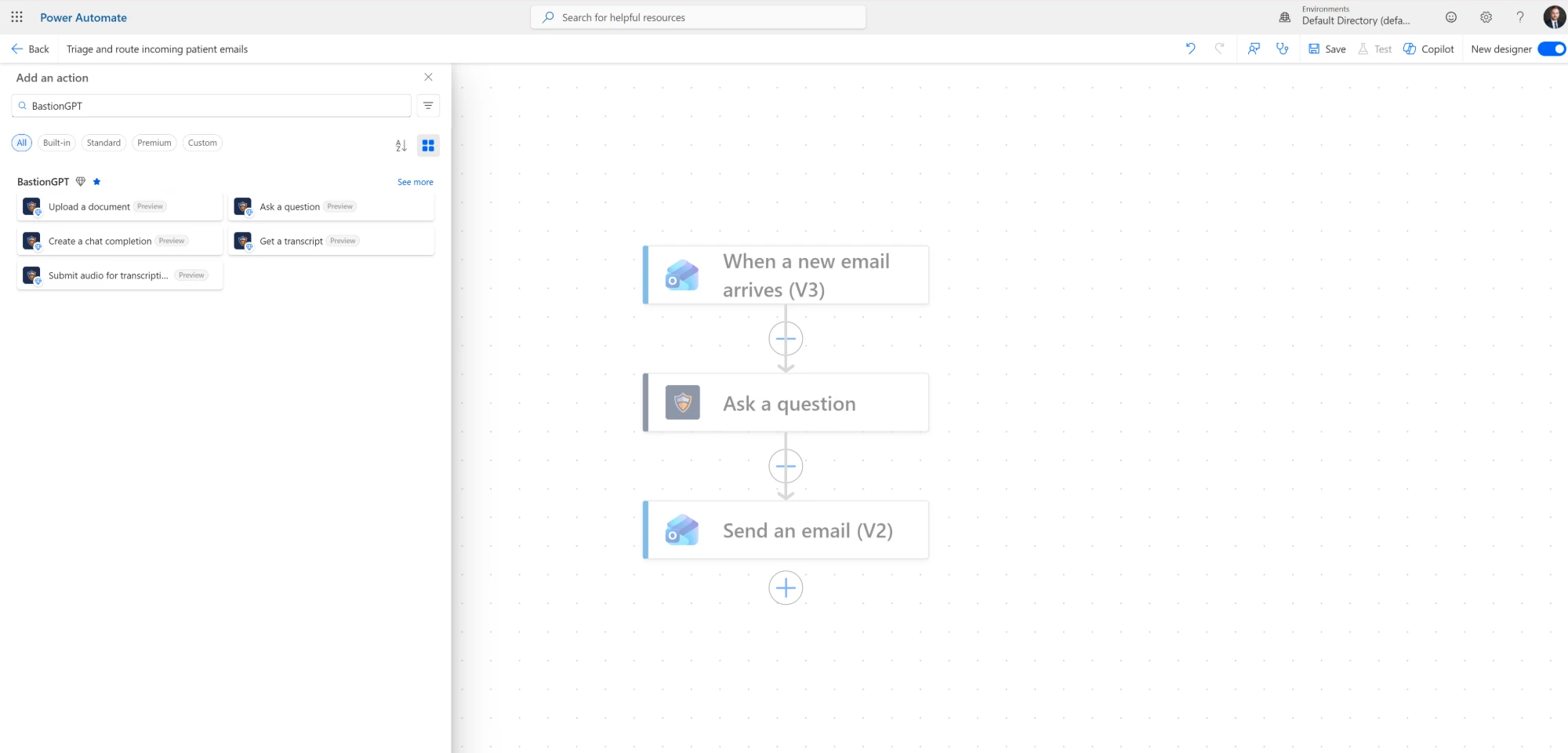
The flow pictured in this post has three steps and took a few minutes to build. When a new email arrives in a shared inbox, the flow starts. BastionGPT's Ask a question action receives the email body with the instruction "Summarize this patient email and flag anything urgent." Send an email delivers the summary to the care team. Add a condition on the answer and urgent messages can route to a different queue.
Transcribe session recordings from OneDrive or SharePoint
Drop a recording into a folder and a flow sends it through Submit audio for transcription, polls Get a transcript in a Do until loop, and files the speaker-labeled transcript next to the audio. Feed the transcript into Ask a question to draft a note in the format your practice uses. This gives you HIPAA-compliant AI transcription inside Power Automate without a separate medical transcription vendor.
Summarize referral packets and records
When a referral PDF lands in SharePoint, Upload a document returns a document ID, and Ask a question pulls out the diagnosis, the referring provider, and the requested service into a list item or a Teams message. Documents stay available to the flow for 30 days, so follow-up questions do not require a second upload.
Give a Copilot Studio agent a compliant AI tool
Copilot Studio agents can call the same actions. A staff-facing agent in Teams can answer questions about an uploaded policy document, or summarize a record a user attaches, with the AI step covered by your BastionGPT BAA rather than left to a general-purpose model.
How to add HIPAA-compliant AI to a Power Automate flow
- Request a BastionGPT API key at bastiongpt.com/api-signup. Keys are typically issued the same business day.
- Open a flow in Power Automate, choose Add an action, and search for BastionGPT.
- Pick an action and create a connection by pasting your API key. The connection is reused by every BastionGPT step in your environment.
- Map your inputs and use the outputs. Answer, Document ID, Transcript ID, and Text are available as dynamic content in the steps that follow.
- Turn on Secure Inputs and Secure Outputs on each BastionGPT step that handles PHI, so patient data is masked in run history.
What you need
- A BastionGPT API subscription. Connector calls are billed on your API subscription at the same rates as direct API requests.
- A Microsoft plan that includes premium connectors. BastionGPT is a Premium connector in Power Automate, Power Apps, and Copilot Studio, and a Standard connector in Azure Logic Apps.
Frequently asked questions
Does Microsoft's BAA cover third-party connectors in Power Automate?
No. Microsoft's BAA covers in-scope Microsoft services. A connector that sends data to a non-Microsoft service is only covered if that vendor has its own BAA with your organization for the service the connector calls.
Can I use ChatGPT in Power Automate with patient data?
Not through consumer ChatGPT, which offers no BAA. OpenAI signs BAAs only for certain API and enterprise customers and only for the services it names, so check the exact coverage before any PHI reaches a flow. The BastionGPT connector avoids the question: every action runs under Bastion Intelligence's BAA.
Is Copilot Studio HIPAA compliant?
Yes. Microsoft's Copilot Studio compliance page states that Copilot Studio is covered under Microsoft's HIPAA BAA, and the same rule applies to the tools you add to an agent: each connector needs coverage of its own. The BastionGPT connector is available to Copilot Studio agents as a Premium action. For Microsoft 365 Copilot itself, see Is Microsoft Copilot HIPAA compliant?
Is Zapier HIPAA compliant? What is the alternative for healthcare?
No. Zapier states that it is not HIPAA compliant, does not sign a BAA, and cannot be used to automate anything involving PHI. Ask any other automation platform the same question before patient data reaches it. For organizations already on Microsoft 365, Power Automate is the alternative that Microsoft's BAA already covers, and the BastionGPT connector adds the AI step under a BAA of its own.
Does the BastionGPT connector work in Power Apps and Azure Logic Apps?
Yes. Microsoft lists it for Power Automate, Power Apps, and Copilot Studio as a Premium connector, and for Azure Logic Apps as a Standard connector.
Is the BastionGPT connector available in GCC or GCC High?
Not yet. The connector is available in Microsoft's commercial clouds worldwide. It is not available in GCC, GCC High, DoD, or China environments.
Which AI models does the BastionGPT connector use?
BastionGPT routes each request to a model from OpenAI's GPT, Anthropic's Claude, or Google's Gemini families, chosen automatically for the task, and all of them run under your BAA with Bastion Intelligence. As of September 2026, no other Power Automate connector provides HIPAA-compliant access to all three.
Does BastionGPT use my data to train AI models?
No. Customer content sent through the API or the connector is never used to train AI models.
Full documentation for the connector, including every input and output, is on Microsoft Learn. If you do not have an API key yet, request access and we will get you set up.